How ClickFix defeats technical controls
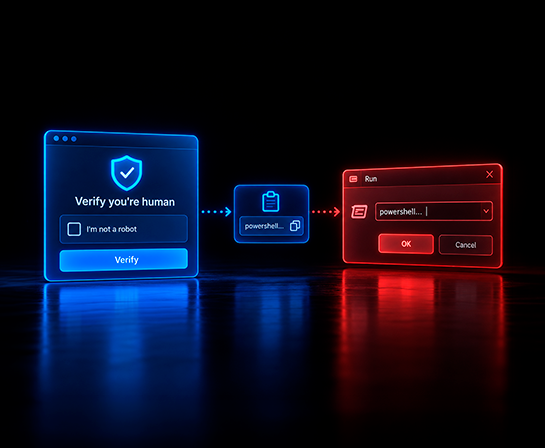
The mechanics matter because they explain why this works past defenses that stop most phishing. The fake verification page uses JavaScript to copy a command into the clipboard. It then instructs the victim to open the Run dialog, PowerShell or Terminal and paste it (Microsoft Security Blog, August 2025).
That command typically calls a legitimate Windows tool, iwr or irm (PowerShell's Invoke-WebRequest and Invoke-RestMethod), to download and run the next stage in memory. Nothing touches disk as a scannable file until code is already executing.
An email filter has nothing to flag, since there's no attachment or link to a credential page. A browser exploit protection has nothing to block, since no exploit runs. A macro-blocking policy has nothing to stop, since no document is involved. The one control layer left is whether the person recognizes the pattern and refuses to paste.
Microsoft has tracked this technique delivering infostealers including Lumma Stealer and Lampion, remote access tools including Xworm, AsyncRAT, NetSupport and SectopRAT, and loaders including Latrodectus and MintsLoader. Threat clusters Microsoft tracks as Storm-1607, Storm-0426 and Storm-0249 use it at scale. Some campaigns reach thousands of enterprise and end-user devices daily, and single malvertising runs have funneled hundreds of thousands of visitors toward the fake verification page in one day.
A recent twist shows the reach isn't limited to careless users
A campaign documented in September 2026 shows the technique reaching further than end users clicking a bad ad. Attackers registered third-party[.]com, a placeholder domain that developers routinely hardcode into documentation and code samples. Unlike example.com, it was never formally reserved, so anyone could register it (Malwarebytes, September 2026).
Anyone who copied a code sample or followed documentation containing that placeholder domain could land on a fake Cloudflare-style verification page without searching for anything suspicious. The page ran the same clipboard-to-Run-dialog trick, using legitimate Windows tools to download and execute the next stage under the victim's own permissions.
That detail matters for how security teams think about who's at risk. This wasn't a phishing email aimed at finance or HR. It reached anyone, including technical staff, who trusted a domain sitting in ordinary documentation.
FileFix shows the technique keeps evolving
Security teams that build a specific defense against ClickFix should expect attackers to route around it, and that's already happening. FileFix, first documented in June 2025, moves the same trick from the Windows Run dialog to File Explorer's address bar (SOCRadar, updated September 2026).
The lure changes too. Instead of a CAPTCHA, the fake page offers a "shared file" or "secure folder." Opening it launches a real File Explorer window, and JavaScript silently copies a disguised command to the clipboard. The victim is told to paste a "file path" into the address bar and press enter, which runs the command exactly as ClickFix does.
FileFix is harder to catch for a specific reason. It happens inside a trusted, familiar interface people use dozens of times a day, not a command-line tool that already feels technical. A paste into Explorer's address bar looks like normal file navigation in any forensic log, which makes it harder to distinguish from routine activity after the fact.
Why this is a human risk problem, not a filter problem
Nothing about ClickFix is exotic once someone explains it, which is exactly the point. There is no way for a technical control to tell a system administrator's legitimate PowerShell command apart from a tricked employee's malicious one. Both are a person, running a real Windows tool, with real permissions.
That leaves one narrow behavior to train: never copy a command from a website and run it, no matter how official the fix or verification step looks. That's a sharper instruction than generic advice to "avoid suspicious links," specific enough that someone can remember and apply it under pressure.
For security teams, the practical response splits two ways. Detection can watch for PowerShell processes spawned directly from Explorer or a browser, and for iwr/irm calls that don't match known IT scripts, though this generates noise and needs tuning. Training can focus narrowly on the copy-paste-run pattern itself, tested the same way phishing simulations test link-clicking. This is a distinct behavior that needs its own repetition, not a subset of general phishing awareness.
This reflects the same question Zepo keeps coming back to: the message that gets through is the one that looks like routine troubleshooting, not the one that looks dangerous.
FAQ
What is ClickFix? ClickFix is a social engineering technique that uses a fake CAPTCHA, error message or verification prompt to trick a person into copying a malicious command to their clipboard, then manually pasting and running it themselves, typically through the Windows Run dialog, PowerShell or Terminal.
Why does ClickFix bypass antivirus and email filters? Because the victim executes the command by hand using a legitimate system tool, there is no malicious attachment, link or exploit for a filter to detect, and nothing touches disk as a scannable file until the code is already running in memory.
How fast is ClickFix growing? ESET tracked a 517% surge in ClickFix attacks over a six-month period, making it the second most common attack vector after phishing itself (ESET research, June 2025).
What malware does ClickFix deliver? Microsoft has observed it delivering infostealers like Lumma Stealer, remote access trojans like Xworm and AsyncRAT, and loaders like Latrodectus, operated by threat clusters including Storm-1607, Storm-0426 and Storm-0249.
What is FileFix? FileFix is a variant of ClickFix that uses File Explorer's address bar instead of the Windows Run dialog. A fake page offers a "shared file" or "secure folder." It walks the victim through pasting a disguised command into Explorer, which runs it the same way ClickFix does through Run or PowerShell.
How do you defend against ClickFix? Pair narrow detection, watching for PowerShell or Terminal processes launched directly from a browser, with training focused specifically on refusing to copy-paste-and-run any command a website asks for, tested on its own rather than folded into generic phishing simulations.


.png)
.png)
.png)

.png)
