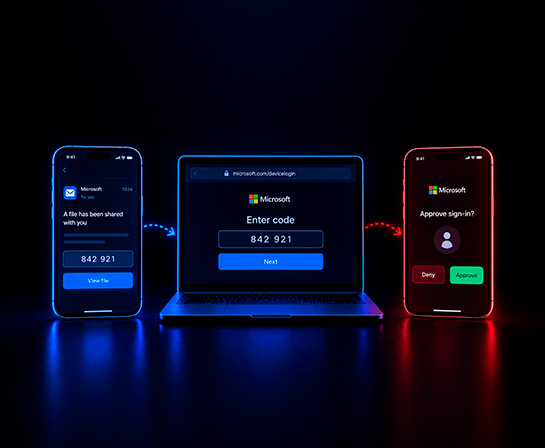
An employee opens an email about a shared file or an overdue invoice. The message links to microsoft.com/devicelogin, the real Microsoft site, and includes a short code to enter. The employee types the code, completes their own multifactor authentication, and moves on with their day.
Nothing about the process looks wrong, because nothing about it is fake. Every step runs on Microsoft's own infrastructure. What the employee doesn't know is that the code came from an attacker, and approving it handed over a live session, not access to a shared file.
What device code phishing exploits
The OAuth 2.0 device authorization grant, defined in RFC 8628, was built for devices without a keyboard: smart TVs, conference room systems, command-line tools. The device displays a code. The user enters that code on a second device, at microsoft.com/devicelogin, to link the two.
The design assumes the person requesting the code and the person approving it are the same. Attackers break that assumption. They request the code themselves, send it to a target with a pretext, and wait.
When the target enters the code and completes their own multifactor authentication, the resulting session token goes to the attacker's system, not the target's.
A campaign that spread across five continents
More than 340 Microsoft 365 organizations in the United States, Canada, Australia, New Zealand, and Germany were targeted. Researchers first detected the campaign on February 19, 2026 (The Hacker News, March 25, 2026). It later spread to organizations across the Americas, Europe, the Middle East, Asia, and Oceania.
Construction, non-profit, real estate, manufacturing, financial services, healthcare, legal, and government organizations were hit hardest. Researchers trace the technique's origin to a group tracked as Storm-2372. Later waves came from other actors using commercial phishing kits, which put the technique within reach of attackers without deep technical skill.
Follow-up research into the same activity found a six-stage pattern, from reconnaissance through persistence. Attackers first confirmed which accounts were valid, then sent phishing emails with pretexts ranging from invoices to shared files, some written with generative AI tailored to the target's role. The device code itself was generated the moment a victim clicked, so it stayed valid long enough for them to act. Attackers checked repeatedly for a completed login.
Once inside, they set hidden inbox rules, registered new devices, and identified high-value profiles inside the account: finance, executive, and admin.
Why multifactor authentication doesn't stop it
Multifactor authentication worked exactly as designed in this campaign. The victim entered a password if one was required, approved a prompt or entered a one-time code, and their identity was confirmed.
MFA didn't fail technically. The victim approved a session that wasn't theirs.
That distinction matters. A vulnerability gets patched. A trust assumption has to be unlearned, one employee at a time.
Device code phishing joins a pattern we've tracked before: vishing calls that captured MFA codes in real time, and wire transfers approved after MFA cleared every check. In each case, the technology performed correctly. The person authorizing the action didn't know what they were authorizing.
The training gap this exposes
Most security awareness training teaches employees to spot a fake login page: a wrong domain, a missing padlock, a URL that almost matches the real one. Device code phishing carries none of those signals.
The domain is real. The page is real.
The only thing to question is why a code arrived in an email at all. That's a harder thing to train for than a suspicious link. It asks an employee to interrupt a process that looks completely normal, based on a judgment about intent rather than a technical red flag. Training built around phishing indicators doesn't reach that judgment. Training built around behavior might.
What this means for security teams
Technical controls help. Conditional access policies can block the device code flow for accounts that don't need it, and restricting device registration limits what an attacker can do with a stolen session. Neither control teaches an employee to recognize the pattern the next time it shows up somewhere those controls don't reach.
Security teams should pair those controls with training that teaches employees to question any unsolicited code, not only a suspicious link. Blocking the flow and building recognition are different jobs, and a program that covers one leaves the other gap open.
That raises a question worth sitting with rather than answering quickly: what would it take to prepare employees for an attack that borrows real infrastructure instead of faking it? Any simulation of a flow that touches real authentication systems would need firm guarantees, no real user data exposed, and any access granted during the exercise revoked immediately. Getting that balance right, realistic enough to build recognition and contained enough to stay safe, is a harder design problem than a typical phishing simulation. It's also where the problem points next.
A control that blocks a flow can be routed around. An employee who recognizes the pattern can't be.
Device code phishing didn't succeed at 340 organizations because multifactor authentication was weak. It succeeded because it asked employees to trust a process that looked, and was, genuinely built by Microsoft.
That's a harder problem than a fake login page, and it's the one human risk management has to solve next. This is the third pattern we've tracked where MFA does exactly what it's supposed to do, and the account still falls.
The others: vishing calls that captured MFA codes in real time, and a $60 million wire transfer approved after MFA cleared every check.


.png)
.png)
.png)

.png)
